Business profile · Fitness apps
Tiles: Map Your Adventures
Your workouts together on one map.
An iPhone app that imports Apple Health workout routes, GPX, FIT, and CSV files to visualize explored places on an interactive map.
About
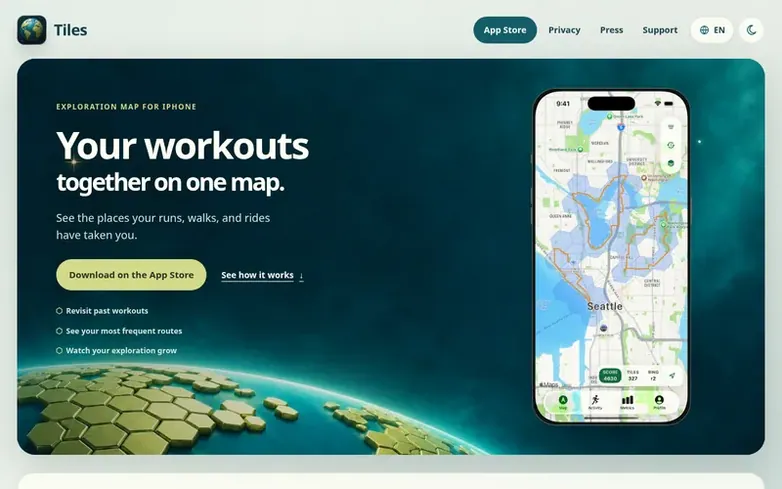
Tiles is an iPhone app that transforms completed workout routes and geotagged photos into an exploration map. Users can import activities from Apple Health, GPX, FIT, and CSV files, or create Photo Journeys from eligible geotagged photos. The app visualizes explored places through multiple map modes including routes, explored tiles, heatmaps, and exploration fog. A paired Apple Watch companion provides nearby tile maps, walking directions, and optional background tile collection. Tiles does not record workouts itself, but aggregates existing activity history. Data is stored on-device with optional private iCloud sync and backup. Users can also connect Strava directly with Tiles Pro to sync recent route activities.
Features at a glance
- Support for GPX, FIT, and CSV route files
- Photo Journeys from geotagged photos
- Multiple map visualization modes
- Heatmap view of visited places
- Strava integration with Tiles Pro
- Apple Watch companion app
- Optional private iCloud sync and backup
- Achievement stamps and milestones
- Exploration fog mode to highlight gaps
Pricing
Pricing model: Freemium
Free with limited history (last three calendar months). Annual and Lifetime purchases unlock full history and Pro features including file imports, advanced map modes, and deeper Metrics.
Compare and explore
- Alternatives to Tiles: Map Your Adventures
- Postural vs Tiles: Map Your Adventures
- Setlume vs Tiles: Map Your Adventures
- Tiles: Map Your Adventures vs AddFive
- Tiles: Map Your Adventures vs PullUp Pilot
- Tiles: Map Your Adventures vs Pauzenna
- Catalyst Performance vs Tiles: Map Your Adventures
- More in Fitness apps
Quick answers
- Is my location data uploaded anywhere?
- Apple Health, photo-journey and file imports are processed on your device. If you connect Strava, a Tiles-operated service retrieves your activities and routes from Strava. Optional private iCloud Sync and automatic backups start enabled on fresh installs and can be turned off in Settings.
- What can I import?
- You can import Apple Health walks, runs, rides, and hikes; GPX, FIT, and CSV route files; and Photo Journeys made from eligible geotagged photos.
- How do Strava and Garmin routes get into Tiles?
- Connect Strava directly with Tiles Pro to sync recent route activities. Tiles also reads routes from Apple Health. Garmin routes need Health Sync, RunGap, or a FIT or GPX export.
- Is it free?
- Tiles is free to download. Your first Health or Photo Journeys import includes the last three calendar months and new activities stay in your history. Annual and Lifetime purchases permanently unlock full available history and Pro features.
- What does the Apple Watch companion do?
- The paired Apple Watch app shows today's and weekly progress, a nearby tile map, and a discovery compass. It allows you to follow walking directions and collect nearby tiles without recording a workout.
Leave a review for Tiles: Map Your Adventures
Reviews of Tiles: Map Your Adventures: none yet. Be the first.
Reviews: free. Paid reviews: not possible. See the review file
Reviews and questions · Latest info · Share this info · Your business? Claim this profile · Report outdated info
Tiles: Map Your Adventures has a free listing. The owner can unlock the full profile with a paid launch for $5:
- Founder story (locked)
- Milestones (locked)
- Demo video (locked)
- Dofollow website link (locked)